September 2026 update: the original Portuguese version of this post was published in 2020. I have now revised the parts that have aged and used that updated article as the basis for this English version.
If you have ever found a useful PHP library on GitHub and given up because the instructions said “Install via Composer,” this post is for you.
What is Composer for PHP?
Composer is PHP’s dependency manager. Whenever your website or application needs third-party code or a library, it is probably a good idea to include it through Composer. If your code needs one library and that library needs a third one, Composer manages that for you.
Although Composer can use code available almost anywhere—from GitHub repositories to a ZIP file hosted somewhere—the standard place for Composer packages is Packagist.
Examples of using Composer
Payment gateways and social network APIs
Payment gateways and social networks often provide libraries in several programming languages to make their APIs easier to use. If your payment gateway has a PHP package but no WordPress plugin, the plugin does not need to reinvent the wheel. You can use the PHP library as a base. The same applies to your favorite social network or any similar service.
Utility libraries
Another common use for Composer is adding utility libraries, such as a collection of mathematical functions.
How to install Composer
The only prerequisite is having PHP available on the command line.
Linux and macOS
To install Composer on Linux or macOS, follow the instructions in the official documentation. Basically, you download a PHP file that checks the PHP configuration available in your terminal. If everything is fine, that file downloads composer.phar (PHAR means PHP Archive, which is similar to Java’s .jar). To call Composer, run php composer.phar <command>.
If you want Composer available from every directory, move composer.phar to a directory included in your $PATH environment variable and rename it to composer (without an extension). Then you no longer need to put php in front of it. You can do that with one command:
mv composer.phar /usr/local/bin/composerWindows
On Windows, download and install Composer using the executable linked in the official documentation. It does basically the same thing as the Linux and macOS installation, but creates a .bat file for you.
How to use Composer WITHOUT installing it
Few people know this (because they did not read the documentation), but you can use Composer without going through all those steps. Go to Composer’s Download page and download composer.phar. Composer will then be available in that directory through php composer.phar <command>, or simply ./composer.phar <command> if you give the file execution permission with:
chmod +x composer.pharNote that you need to use ./ before composer.
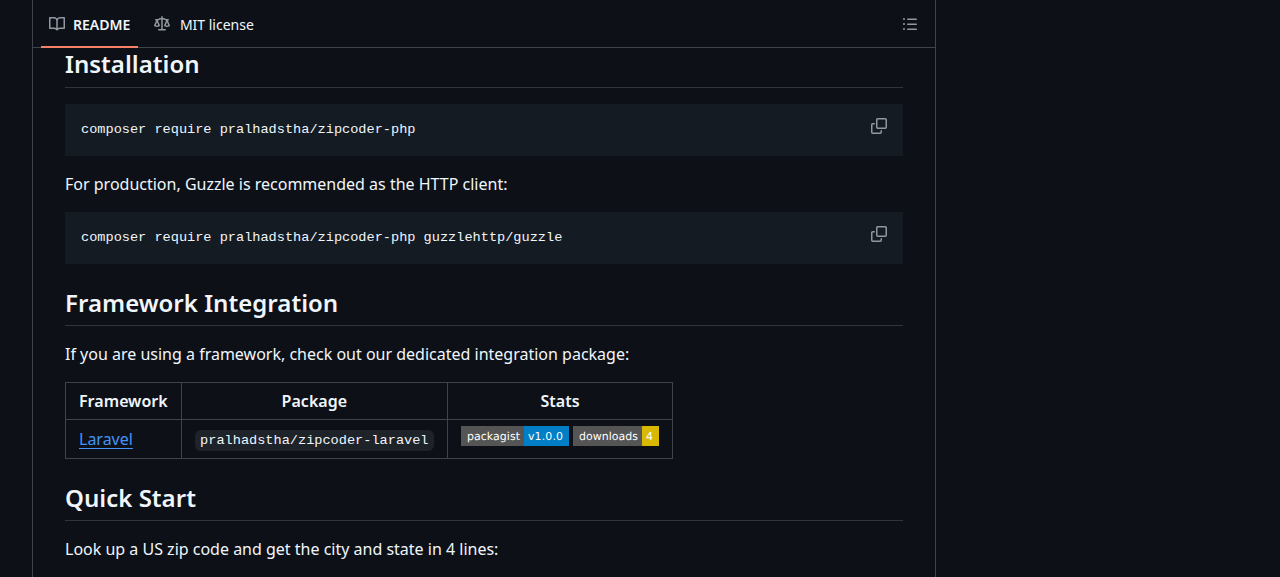
Practical example: looking up a ZIP code with a Composer package
Note about the example: Zipcoder requires PHP 8.2 or newer. The built-in HTTP client also requires the PHP cURL extension, and the lookup depends on an external postal-code service.
Let’s suppose we are building a WordPress plugin that needs to look up a ZIP code. This repository provides that functionality, so we do not need to write as much code. Now that we know what Composer is and how to install it, that “Install via Composer” instruction is no longer scary.
Creating the plugin
Creating the plugin is easy. Make a directory called composer-example inside the wp-content/plugins directory of your WordPress installation. Inside it, create a file named composer-example.php with only the minimum plugin header:
<?php
/**
 * Plugin Name: Composer example
*/Once that is done, activate the plugin in the WordPress dashboard.
Installing the package through Composer
Just to show how easy this is, we will not install Composer on the computer. We will download it directly into our plugin directory. Remember that, if you are a PHP developer, you are expected to have Composer installed in the usual way.
After following the steps for using Composer without installing it, the plugin directory will look like this:
wp-content/
└── plugins/
└── composer-example
├── composer.phar
└── composer-example.phpNow install the package with this command:
./composer.phar require pralhadstha/zipcoder-phpThis makes Composer:
- Create a
composer.jsonfile containing the names of the packages we use; - Create a
composer.lockfile containing the versions of every dependency Composer found; - Create the
vendordirectory, where the packages are actually stored.
Inside the vendor directory, Composer creates an autoload.php file. To use Composer’s magic and the packages we installed, include or require that file.
To make the structure easier to see, the complete plugin directory now looks like this:
composer-example/
├── composer-example.php
├── composer.json
├── composer.lock
├── composer.phar
└── vendor/
└── autoload.phpUsing the package in our WordPress plugin
According to the package documentation, we create a Zippopotamus provider and pass it a ZIP-code query. Just to demonstrate it, we will use the the_content filter to replace every post’s content with the data returned for one ZIP code. If you want another example of WordPress working with external data, see my post about the WordPress REST API.
Do not forget to include the autoload.php file from the vendor directory created by Composer.
The final plugin code looks like this:
<?php
/**
 * Plugin Name: Composer example
 */
use Pralhad\Zipcoder\Http\CurlPsr18Client;
use Pralhad\Zipcoder\Provider\Zippopotamus;
use Pralhad\Zipcoder\Query;
require __DIR__ . '/vendor/autoload.php';
add_filter( 'the_content', function ( $content ) {
$http = new CurlPsr18Client( timeout: 10 );
$provider = new Zippopotamus( $http, $http );
$result = $provider->lookup( Query::create( '90210', 'US' ) );
$address = $result->first();
$location = array(
'zip_code' => '90210',
'city' => $address->city,
'state' => $address->state,
'state_code' => $address->stateCode,
);
return '<pre>' . print_r( $location, true ) . '</pre>';
} );
The post will look like this:
Array
(
    [zip_code] => 90210
    [city] => Beverly Hills
    [state] => California
    [state_code] => CA
)The possibilities are endless: get the ZIP code from a custom field, a $_GET parameter, a form value, and so on.
Frequently asked questions about Composer
Does my server also need Composer?
No. You can upload the vendor directory with all its contents. Composer only does something when you run it from the command line. Every file and directory it creates works through PHP itself.
How does Composer affect my project’s version control?
It depends on you and the strategy your team decides to adopt. You can version only composer.json and composer.lock, then require the team to run composer install to download the packages. This is usually considered the cleaner strategy because you do not version the same code twice and the repository stays smaller.
On the other hand, nothing prevents you from versioning everything. That works too.
Can I change the contents of the vendor directory?
That is not recommended because the packages may be overwritten when someone runs composer install. Well-made packages can be configured from outside the directory, either by extending a class or calling a method that sets API keys and similar options. Unfortunately, there are cases where packages need to be changed directly. Always communicate that need to the team and document it somewhere.
Can Composer help me manage the plugins and themes of a WordPress site?
I am glad you asked! The answer is YES, and that will be the subject of a second part of this post. Subscribe to the newsletter so you do not miss it.